Welcome

I've been a Principal Designer at LinkedIn since April 2008. Below are some of the projects I've worked on while there. To see examples from other companies, click the company name on the right.


Following Thought Leaders on LinkedIn

In 2012, I was part of the team that designed and launched the Influencer program on LinkedIn. 150 thought leaders from a variety of industries were recruited to publish articles on LinkedIn (people like Richard Branson, Barack Obama, and Mitt Romney). LinkedIn members were given the ability to Follow these thought leaders, as well as Like, Share, and Comment on their posts.

Below is the discovery experience. At the top is a rotating area that suggests thought leaders the member may wish to follow. Beneath that is a list of thought leaders that the member is able to filter by most popular, recently posted, alphabetical, and ones they are already following.


The image on the left is from the "Where I work" email campaign we launched in February, 2013. Sixty LinkedIn influencers published posts describing their work setting and why they chose it. The posts provided a rare insight into the everyday work environment of some on the most influential professionals in the world.


LinkedIn Company Pages

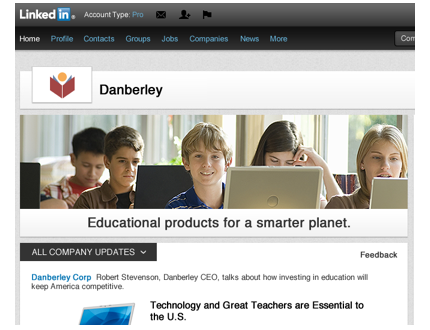
In 2012, I led the redesign of LinkedIn Company Pages. Companies use these pages to showcase their brand, products, and career opportunities. Previous versions had been largely text based and static. The redesign gave companies the ability to communicate their brand via images, as well as the ability to post status updates about the company. Information that had previously been buried under tabs, was pulled out into "teaser modules" that gave a hint of the information the user would see if they clicked.

The primary call to action on company pages is "Follow". Members who follow a company receive status updates from the company as well as insights about the company - such as how they are connected. Company admins were also given the ability to "target" status updates to particular types of members based on Job Title, Geography, Industry, and other facets.


Matching Employers with Job Seekers

During my time at LinkedIn I have had the opportunity to completely redesign the jobs experience - Job Seeker, Hiring Manager, and Recruiter. One of the goals of the redesign was to move the job experience away from the traditional "post and search" model, and more into a service that recommends matches to both the job seeker and the employer.

Below is a screen capture from the Jobs Home Page on LinkedIn. The page is intentionally simple and uncluttered. Notice the section "Jobs you may be interested in". These are recommendations based on what we know about you from your LinkedIn profile, as well as people like you. Because LinkedIn profile data is so rich, we are able to make some very good recommendations.

When a job seeker views a job on LinkedIn, they see how they are connected to the job - that is, who in their network can help them land this job. They can also share the job with others (on Twitter, Facebook, or LinkedIn groups) as well as follow the company.

Matching works both ways. LinkedIn suggests jobs to the job seeker, it also suggests candidate matches to the job poster. Below is a screen capture that shows suggested candidate matches. These matches are based on the job description the job poster created. Each match has a match score, and the recruiter or hiring manager can save the match as well as send a message to the potential candidate.


Apply with LinkedIn

A LinkedIn profile serves as your professional identify on the web. People conducting web searches for particular skills are able to find and connect with you. Your profile serves as a place for you to tell your professional story. Where did you go to school? Where have you worked? What accomplishments are you most proud of?

A LinkedIn profile overlaps a lot with a resume, so why have both? In 2011 we asked ourselves that same question, and decided there was no reason. We know that most recruiters always look at LinkedIn profiles for candidates, so why not just eliminate the resume and let Job Seekers apply directly with their LinkedIn profile.

In May 2011 we began testing Apply with LinkedIn. Below is a screen capture from the initial version. Someone viewing a job listing on an employer website is given a choice of filling out an application form, or using their LinkedIn profile. When the job seeker chooses to use LinkedIn, a window opens displaying their profile. The user clicks Submit Application and the information is sent directly to the employer - either by email or by ATS integration.

Not surprisingly, the response to Apply with LinkedIn has been overwhelmingly positive. Apply with LinkedIn is a major milestone in the evolution of the professional web.


LinkedIn Recruiter

In addition to the main LinkedIn site (linkedin.com), LinkedIn also has other products. While at LinkedIn I've had the opportunity to redesign one the most popular of these products - LinkedIn Recruiter.

The primary objectives of the redesign were:

 · Bring relevant information to the user rather than making them search for it.
 · Reduce the amount of space devoted to navigation. Free-up space for page content.
 · Bring the design more in line with the recently redesigned LinkedIn consumer site.
 · Provide users with information about team members.
 · Foster re-use of designs and code between the consumer and recruiter web sites.

Below is a closeup of the redesigned Recruiter home page. The home page provides a dashboard of activity relevant to the Recruiter, including team activity across projects.

Below is another example from LinkedIn Recruiter that shows some the the analytics features. Administrators see a roll-up of information across the recruiting team.

LinkedIn Recruiter is an indispensable tool for thousands of corporate recruiters. We worked closely with our customer partners in designing the new version. First, we held in-person sessions where we listened to the needs of our users. As we designed the new version we showed it to a sample of our customers and iterated on the design based on their feedback.

Most enterprise software does not have a good reputation a for being easy to use. Our goal was to change this by taking the best of what we had learned from the LinkedIn consumer site and applying it to the needs of corporate users. The response from customers has been very positive. It's not uncommon for us to hear comments like "that sure doesn't look like enterprise software". That makes us smile a lot. We are learning more every day and have lots of additional enhancements planned.


Click below to see examples of LinkedIn Recruiter before the redesign
Recruiter Home Page
Search Results


Below are some links with additional information.

 · 2011 LinkedIn Recruiter navigation redesign

 · 2010 LinkedIn Recruiter homepage redesign.


LinkedIn Site Navigation

In 2009 I led the redesign of LinkedIn site navigation - a total revamp of primary, secondary, and tertiary navigation across LinkedIn. This was a massive effort that touched every page on the site. In addition to simplified navigation, the redesign updated the visual style of the site and freed up an additional 30% of screen real estate for page content.

The old persistent left-hand navigation was removed and a new global navigation bar was introduced on the top of the page.


The global navigation bar

The global navigation bar is always available. Menus provide quick access to popular LinkedIn features. For example, the Groups menu has links for finding and creating groups; it also has quick links for the groups you access the most often.


Local Navigation

When the user is in an area of LinkedIn (such as Jobs or Groups) they see local navigation. The major sub areas are in tabs along the top of the page. If the page allows filtering of content (such as Discussions or Search Results) these options are shown on the left.


The redesign process

We began the redesign effort by analyzing how people use LinkedIn. We looked at what features people use the most and pored over several years of usability research on the site. Armed with this information we began doing design explorations of how to better organize LinkedIn features, and make them more convenient to find and use.

We factored into this effort additional features we knew were coming. We narrowed down the designs to a few candidates we felt were strong contenders. We then prototyped these designs and had users perform tasks with the prototypes in the usability lab. We went through numerous iterations until we arrived at a design we felt worked the best. We rolled the design out slowly, first with just a small percentage of users. Gradually we ramped up until we were at 100%

Unlike other websites that have alienated their user base with major changes to the user interface, the LinkedIn navigation redesign was well received by the press and by users.


Click below to see examples of LinkedIn before the redesign.
Home Page
Profile
Search Results


Below are my posts to the LinkedIn Blog announcing the new design.

 · Blog post announcing general availablity of new design.

 · Initial blog post announcing testing of the new design.


Copyright 1996-2012, Kevin Bury, All rights reserved sucka. Reuse without permission will cause me to sic my giant labrador on you, who will lick you in the face until you surrender.
User Interface Designer
Man about town
LinkedIn:kevinbury
Twitter:@kevinbury
Recommended Links
Fun Stuff